
Short answer: gtag.js is Google's JavaScript library for the Google tag. You paste a short snippet with your ID (G- for GA4, AW- for Google Ads) into the <head>, and it sends page views and events to Google. Google Tag Manager (GTM) is a separate tool that loads the Google tag and any other tags from one container you edit in a web interface. Use gtag.js for a simple site with only GA4; use GTM when you also run ads, track events or add tools like Meta Pixel or Clarity.
What is gtag.js?
gtag.js stands for global site tag. Since 2022 Google calls it simply the Google tag: one tag that can send data to GA4, Google Ads and other Google products. The code you get in GA4 under Admin → Data streams → View tag instructions looks like this:
<!-- Google tag (gtag.js) -->
<script async src="https://www.googletagmanager.com/gtag/js?id=G-XXXXXXX"></script>
<script>
  window.dataLayer = window.dataLayer || [];
  function gtag(){dataLayer.push(arguments);}
  gtag('js', new Date());
  gtag('config', 'G-XXXXXXX');
</script>
Line by line: the first script downloads the library from Google. The second creates the data layer, defines the gtag() function that pushes commands into it, and runs config with your ID, which sends the first page view. Yes, the file comes from googletagmanager.com, which is why people mix the two up. It is still gtag.js, not a GTM container.
What gtag commands do
gtag('config', 'G-XXXXXXX')connects the page to a GA4 property or Google Ads account and sends a page view.gtag('event', 'generate_lead', {value: 50, currency: 'EUR'})sends an event. This is how a form, call or purchase gets to GA4 without GTM.gtag('set', {...})sets values for all following events, such as a user property.gtag('consent', 'default', {...})andgtag('consent', 'update', {...})pass the visitor's cookie choice for Consent Mode.gtag('get', 'G-XXXXXXX', 'client_id', callback)reads a value back, for example to send the client ID to a CRM.
Every extra event means a developer adds a line of code to the site. That is the point where most businesses switch to Tag Manager.
gtag.js vs Google Tag Manager

Google Tag Manager loads gtm.js instead. Inside the container you add a Google tag with your G- ID, so GA4 still runs on gtag.js under the hood; GTM just decides when it fires. The practical difference is who can change tracking: with gtag.js a developer edits the site, with GTM a marketer adds a tag, tests it in Preview mode and publishes a new version that can be rolled back.
Which one should you use?
- gtag.js is fine for a small site that only needs GA4 page views and the automatic events from enhanced measurement. A WordPress plugin such as Google's Site Kit installs it for you.
- GTM is better as soon as you have Google Ads conversions, form or phone tracking, Meta Pixel, Clarity or a cookie banner that has to control all of them. Our tracking setups always use GTM for that reason.
What you should not do is run both with the same GA4 ID: a gtag snippet in the theme and a Google tag in GTM. Every page view is then counted twice, sessions look normal but views per session double, and engagement numbers drift. If you move to GTM, remove the old snippet in the same release.
How to check which one a site uses
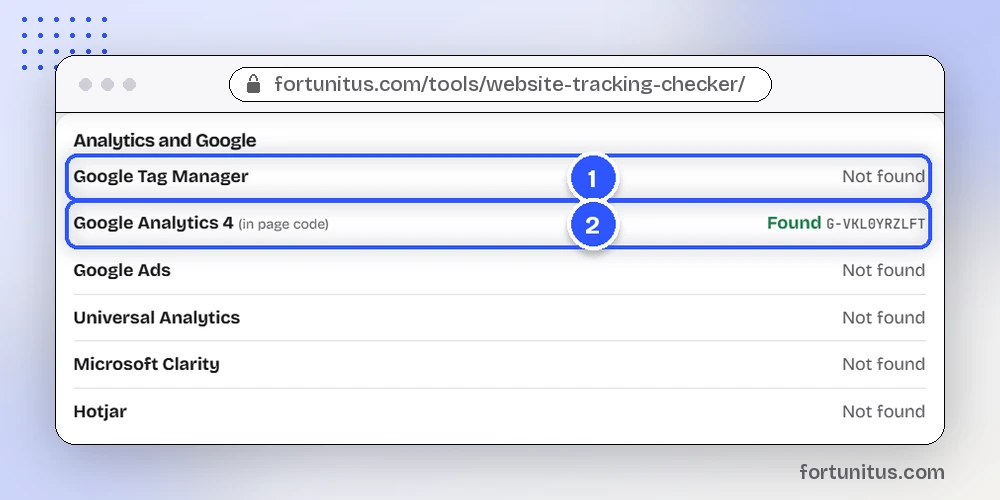
Our website tracking checker reads the page code and the public GTM container. A site with gtag.js only shows no Tag Manager (1) and GA4 found in the page code (2):
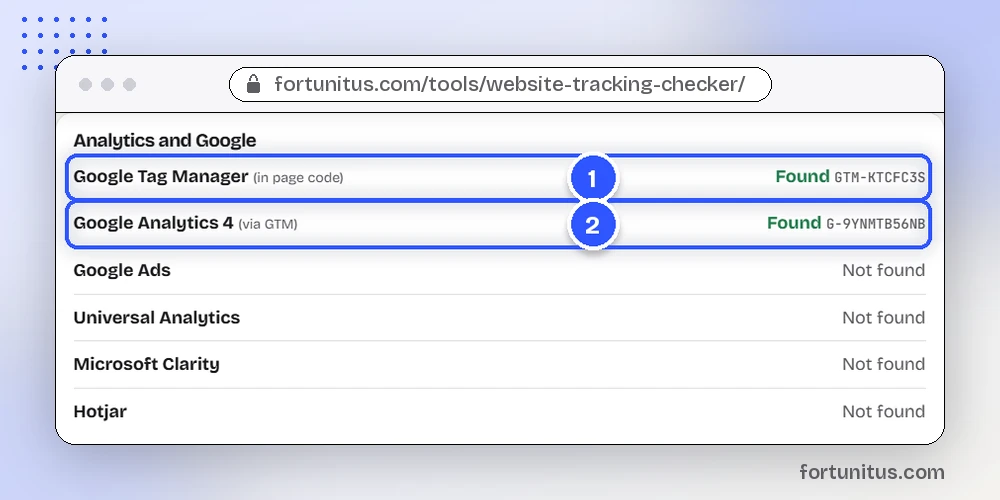
A site with Tag Manager shows the container ID (1) and GA4 found inside the container (2):
You can also look at the page source (Ctrl+U) and search for gtag/js?id= and gtm.js?id=. Seeing both with the same G- ID is the double-counting case. Tag Assistant shows the same thing live and also lists which tags actually fired.
Moving from gtag.js to Google Tag Manager
- Create a GTM container and add a Google tag with your GA4 ID, firing on Initialization - All Pages.
- Recreate each
gtag('event', …)call as a GA4 event tag, ideally fed by data layer events instead of code in the theme. - Test everything in Preview mode.
- Publish the container and remove the gtag.js snippet at the same time, so there is no gap and no double counting.
- Compare page views and key events for a week before and after.