
Short answer: Google Consent Mode is a set of signals your cookie banner sends to Google tags: ad_storage, analytics_storage, ad_user_data and ad_personalization. Each is granted or denied, and the tags adjust what they store and send. Set all four to denied by default, update them when the visitor chooses, and make sure the banner loads before GA4 and Google Ads. Version 2 (the last two signals) is required to keep remarketing and conversion features for EEA visitors in Google Ads.
The four Consent Mode v2 signals

In code, the default state goes in before any Google tag, and the update runs when the visitor clicks a button:
gtag('consent', 'default', {
  ad_storage: 'denied',
  ad_user_data: 'denied',
  ad_personalization: 'denied',
  analytics_storage: 'denied',
  wait_for_update: 500
});

// after the visitor accepts everything
gtag('consent', 'update', {
  ad_storage: 'granted',
  ad_user_data: 'granted',
  ad_personalization: 'granted',
  analytics_storage: 'granted'
});
wait_for_update gives the banner up to 500 milliseconds to restore a choice the visitor made earlier before tags fire. You can also add region: ['LT', 'LV', 'EE', …] to apply the denied default only in certain countries. Most consent platforms write this code for you; Cookiebot, CookieYes and Complianz all send all four signals.
Basic or advanced Consent Mode?

In basic mode the banner blocks Google tags until the visitor accepts. If they refuse, Google gets nothing. In advanced mode the tags load straight away with consent denied and send short pings without cookies or identifiers. Google uses those pings to model what it cannot observe.
That modeling is the main argument for advanced mode, and here is the catch. Google lists the conditions for GA4 behavioral modeling:
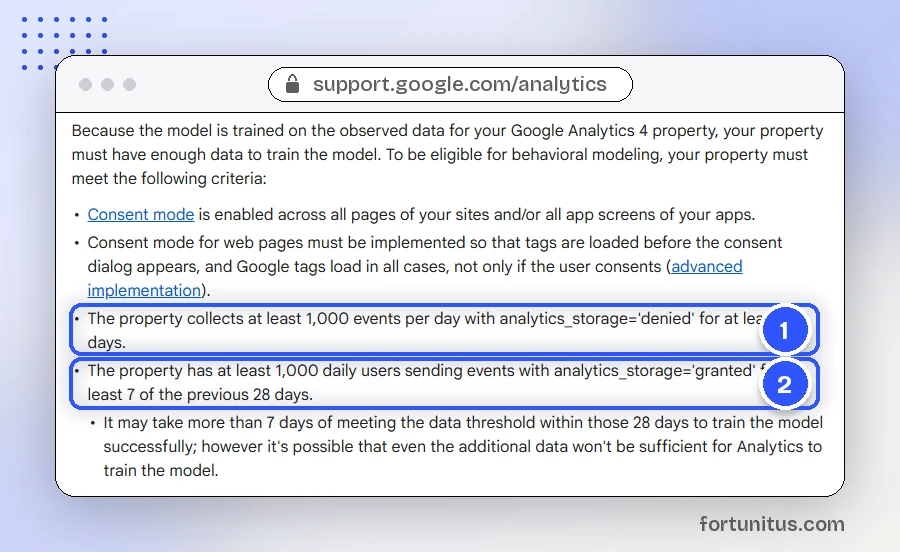
A small business site with 100 to 300 visitors a day will not reach that, so GA4 will not model anything for it. For such sites we usually choose basic mode: it is simpler to explain in a privacy policy and the reports lose almost nothing. Google Ads conversion modeling has separate conditions, so a site that spends seriously on Google Ads may still gain from advanced mode; check them in your Google Ads account.
Consent Mode in Google Tag Manager
- Add your consent platform's GTM template and fire it on Consent Initialization - All Pages, before every other tag. Our GTM triggers guide explains that trigger.
- Turn on Enable consent overview in the container settings. The shield icon in the tag list then shows which tags have consent checks.
- Google tags (GA4, Google Ads, Floodlight) have built-in consent checks and read Consent Mode by themselves.
- Non-Google tags (Meta Pixel, TikTok, Clarity, Hotjar) do not. Set Require additional consent for tag to fire with the right consent type, usually
ad_storageoranalytics_storage.
How to check that Consent Mode works
Start with our website tracking checker. It shows whether a cookie banner was found (1) and whether a Consent Mode default command exists in the page code or the GTM container (2):
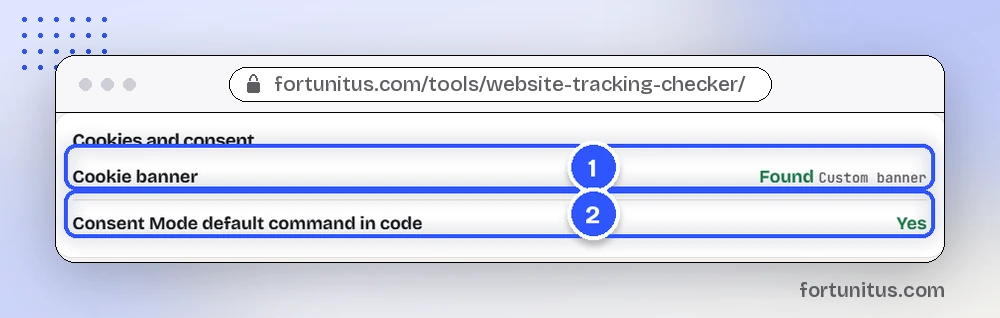
Then test the behaviour, because a default command that runs too late is as bad as none:
- Open the site in a private window and connect Tag Assistant.
- Before clicking the banner, open the Consent tab of the first event. On-page default should show all four signals as Denied.
- Click Accept and check that a consent update follows with Granted.
- In the browser's Network tab, look at requests to
google-analytics.com/g/collect. Thegcsparameter shows the state:G100means ads and analytics denied,G111both granted. - Refuse in a new private window and confirm that no
_ga,_gcl_auor_fbpcookies appear.
Common Consent Mode problems
| Symptom | Likely cause | Fix |
|---|---|---|
| Tag Assistant shows no default consent | The banner loads after the Google tag | Fire the CMP on Consent Initialization, or put the default command above the GTM snippet |
| Google Ads warns about missing consent signals | Only ad_storage and analytics_storage are sent (v1) | Update the CMP or template so it also sends ad_user_data and ad_personalization |
| Meta Pixel fires before consent | Non-Google tags ignore Consent Mode | Add additional consent checks in GTM or use the CMP's script blocking |
| GA4 sessions dropped by half after the banner | Basic mode on a site where many visitors refuse | Expected; compare trends, not totals, or move to advanced mode if the site is large enough |
| Clarity sessions split into single pages | Clarity needs its own consent signal since October 2025 | See our Clarity guide |
Frequently asked questions
What is Google Consent Mode v2?
The current version of Google's consent API. Besides ad_storage and analytics_storage it adds ad_user_data and ad_personalization, which Google Ads needs to keep remarketing and conversion features for visitors in the European Economic Area.
What is the difference between basic and advanced Consent Mode?
In basic mode Google tags do not load until the visitor accepts, so nothing is sent if they refuse. In advanced mode tags load with consent denied and send cookieless pings that Google uses for modeling.
Does Consent Mode replace a cookie banner?
No. Consent Mode only passes the visitor's choice to Google tags. You still need a cookie banner or consent platform that asks for consent and stores the choice.
Will GA4 model my missing data with Consent Mode?
Only if the property is large enough: Google requires at least 1,000 events a day with analytics_storage denied for 7 days and at least 1,000 daily users with analytics_storage granted on 7 of the last 28 days, plus advanced mode.
How do I check if Consent Mode is working?
Open the site in a private window with Tag Assistant, check that the default consent state is denied before clicking the banner and granted after accepting, and look at the gcs parameter in GA4 requests: G100 means denied, G111 granted.
Related guides
Cookiebot vs CookieYes vs Complianz: which cookie banner to pick
Cookiebot, CookieYes and Complianz compared: free plans, real prices, how pricing grows, Consent Mode v2, Clarity support, and which one fits a small site.
Testing and debuggingGoogle Tag Assistant: how to use it, step by step
How to connect Google Tag Assistant to your site, read the Summary, check one event and its consent state, and fix could-not-connect and no-access errors.
Check your own setup in 20 seconds
Run any website through the free tracking checker: GA4, Google Tag Manager, Google Ads, Meta Pixel, cookie banner and what sits inside the GTM container.