
Short answer: for a WordPress site, Complianz (free plugin, $59 a year for premium) or CookieYes (free up to 5,000 pageviews a month, then $10 a month) is usually enough. Cookiebot suits sites on any platform that want a hosted banner priced by the number of subpages, from €7 a month. All three support Google Consent Mode v2. If you use Microsoft Clarity, CookieYes is the only one Microsoft names as an integrated consent platform.
Cookiebot, CookieYes and Complianz side by side

A consent management platform (CMP) does four jobs: shows the banner, scans the site for cookies, blocks scripts until the visitor decides, and keeps a log of each choice. All three do all four. Where they differ:
- Cookiebot (by Usercentrics) is a hosted service you add with one script or through Google Tag Manager. The plan depends on how many subpages the scan finds. The free plan covers up to 50 subpages on one domain; Premium Lite costs €7 a month, or €5.60 a month billed yearly, and moves up a tier automatically as the site grows.
- CookieYes is also hosted and has a WordPress plugin that its own listing says runs on more than a million sites. Pricing follows traffic: free for 100 pages per scan and 5,000 pageviews a month, Basic at $10 a month per domain for 100,000 pageviews, then $0.30 per extra 1,000 pageviews.
- Complianz is a WordPress plugin, not a hosted service. The free version is on wordpress.org; premium costs $59 a year for one site and $179 for five, with no pageview limits.
What each banner looks like
The fairest test is each vendor's own website, because that is the banner they chose to show. All three put a reject option on the first screen, which is what EU regulators expect.
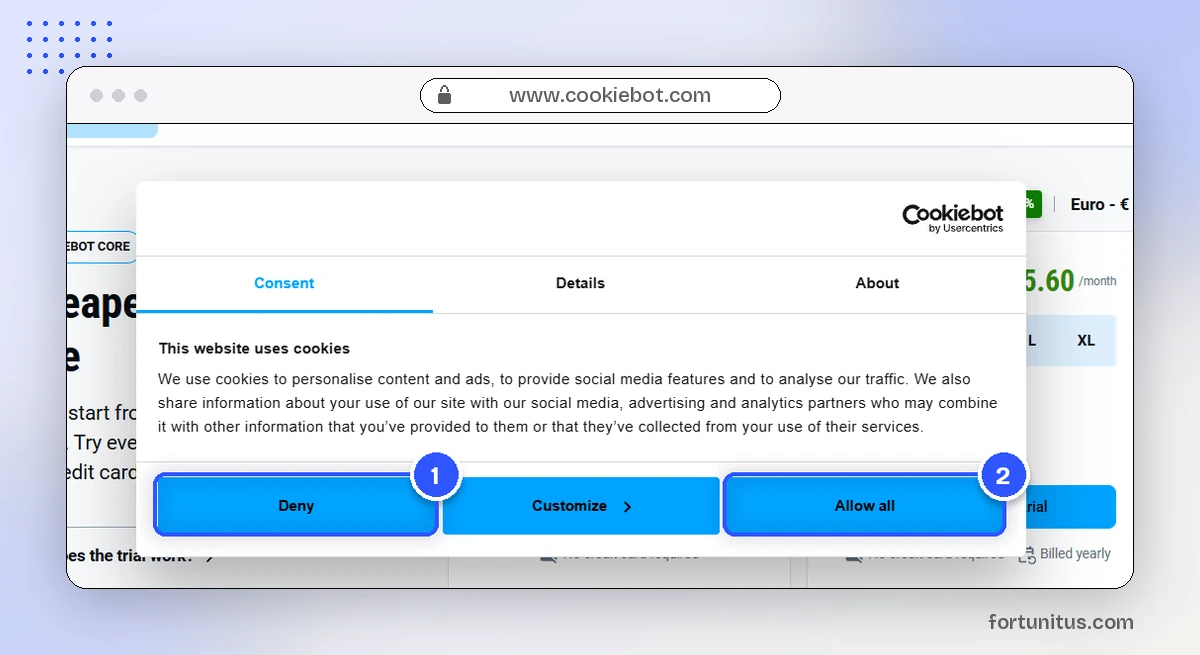


Note the Complianz example: Accept is filled, Deny is only outlined. Several EU regulators treat a reject option that is visibly weaker than accept as a problem, so whatever tool you use, give both buttons the same weight.
What a cookie banner in the EU has to do

The EDPB's cookie banner taskforce (2023) found that most national authorities expect a reject option on the first layer whenever there is an accept button, and that pre-ticked boxes do not give valid consent. The tool only makes this possible; you still have to configure it that way.
Consent Mode v2 and other tags
Google Consent Mode v2 is how the banner tells Google tags what the visitor chose. All three tools send it. Two things go wrong often:
- The banner loads after the tags. In Google Tag Manager the CMP tag must fire on Consent Initialization - All Pages, before GA4 and Google Ads. We explain the trigger order in our GTM triggers guide.
- Non-Google tags ignore Consent Mode. Meta Pixel, TikTok and Clarity do not read Google's consent state by themselves. Block them with the CMP's script blocking or fire them only after consent. Microsoft Clarity needs its own signal since October 31, 2025; see our Clarity guide.
To check the result, open the site in a private window, reject cookies and run Tag Assistant: the consent state should show denied for ad and analytics storage, and no _ga or _fbp cookies should appear. Our website tracking checker shows which CMP and tags a page loads.
Which one should you choose?
| Your situation | Our pick | Why |
|---|---|---|
| Small WordPress site, little traffic | Complianz free or CookieYes free | No cost; both block scripts and send Consent Mode v2 |
| WordPress site with steady traffic | Complianz premium | Flat $59 a year, no pageview limits |
| Shopify, Wix, custom site | Cookiebot or CookieYes | Hosted, works on any platform |
| Uses Microsoft Clarity in the EU | CookieYes | Named by Microsoft as an integrated CMP |
| Many small sites (agency) | Complianz Professional or agency plans | Price per site, not per pageview |
One thing to check before you buy: a pageview-priced plan gets expensive on a busy site, and a subpage-priced plan gets expensive on a large shop with thousands of product pages. Count your monthly pageviews in GA4 and your indexed pages in Search Console first.
Frequently asked questions
Is Cookiebot free?
Cookiebot has a free plan for one domain with up to 50 subpages. Larger sites need a Premium plan, from €7 a month or €5.60 a month billed yearly in November 2026, which rises with the number of subpages.
Is CookieYes free?
Yes, for small sites: the free plan covers 100 pages per scan and 5,000 pageviews a month. The Basic plan costs $10 a month per domain and includes 100,000 pageviews.
Is Complianz better than CookieYes?
For WordPress sites with steady traffic Complianz is often cheaper, because premium is a flat $59 a year with no pageview limits. CookieYes is easier on non-WordPress sites and integrates with Microsoft Clarity.
Do I need a cookie banner for Google Analytics?
In the EU, UK and Switzerland, yes. GA4 sets analytics cookies, so you need consent first, and Google Ads and GA4 in the EEA expect the choice through Consent Mode v2.
Does a cookie banner work with Google Tag Manager?
Yes. Add the CMP tag in GTM with the Consent Initialization trigger so it loads before other tags, then set consent requirements on tags that do not read Consent Mode, such as Meta Pixel.
Related guides
Google Tag Assistant: how to use it, step by step
How to connect Google Tag Assistant to your site, read the Summary, check one event and its consent state, and fix could-not-connect and no-access errors.
Reports and dashboardsMicrosoft Clarity: how to set it up and what to look at
How to set up Microsoft Clarity, read its heatmaps and recordings, connect it to GA4 and pass cookie consent in the EU, with screenshots from the live demo.
Check your own setup in 20 seconds
Run any website through the free tracking checker: GA4, Google Tag Manager, Google Ads, Meta Pixel, cookie banner and what sits inside the GTM container.