
Short answer: UTM parameters are tags at the end of a link, such as ?utm_source=newsletter&utm_medium=email&utm_campaign=black-friday-2026. GA4 reads them and shows the visit under that source, medium and campaign. Always set utm_source, utm_medium and utm_campaign, write everything in lowercase, and pick a medium GA4 recognises (email, social, cpc, referral), otherwise the clicks fall into Unassigned. Our free UTM builder does this for you.
What are UTM parameters?
When someone clicks a link in a newsletter, an Instagram story or a PDF, the browser often does not tell your site where the click came from. Without that information GA4 files the visit as Direct or, worse, Unassigned. UTM parameters fix this by writing the origin into the link itself.

Google also supports utm_id (a campaign ID) and utm_source_platform, and lists utm_creative_format and utm_marketing_tactic, though its help page says the last two are not reported in GA4 yet. For a small business the first three are enough, plus utm_content when you want to compare two links in the same email.
How to build a UTM link
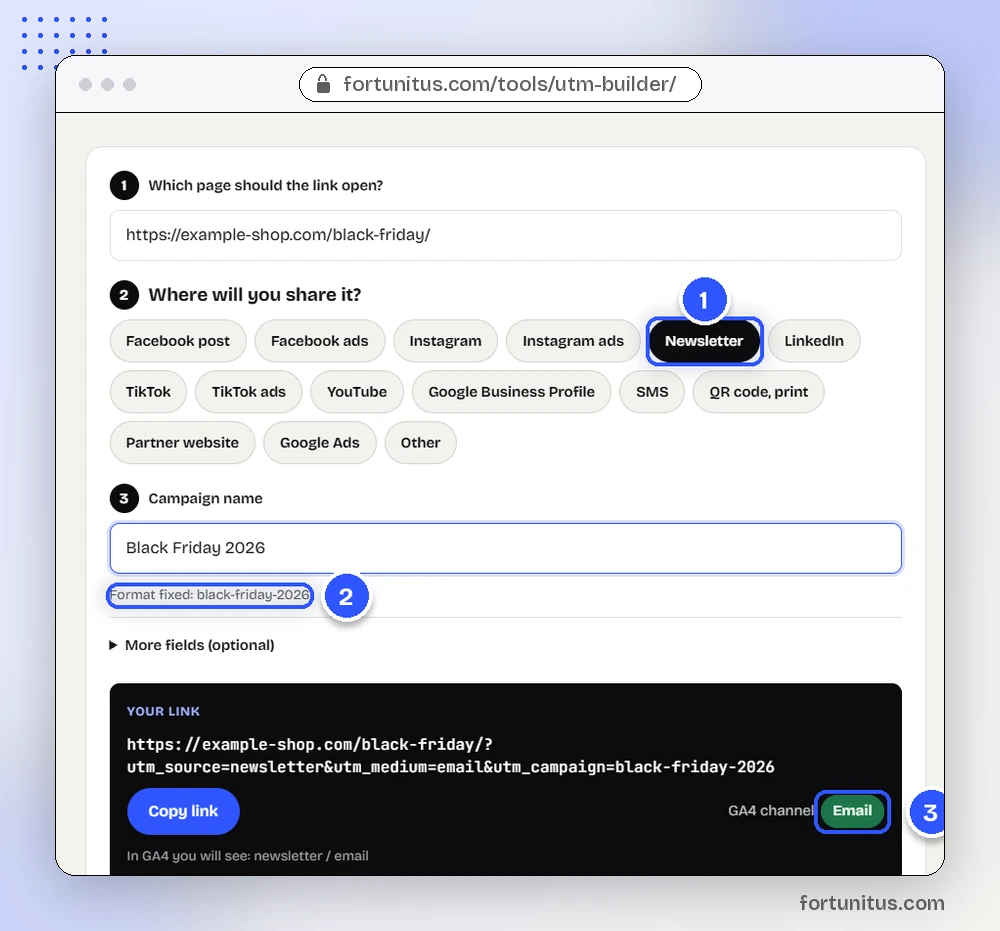
You can type the parameters by hand: add ? after the page address, then name=value pairs separated by &. A builder is faster and avoids typos. We made ours because Google's own tool happily accepts values that later split your reports.
Here is the same link in Google's Campaign URL Builder, typed the way most people type it:

That link works, and GA4 still puts it in the Email channel, because Google's channel rules are not case sensitive. But the reports themselves are: Google's help page says utm_source=google and utm_source=Google are different values. Send one newsletter as "Newsletter" and the next as "newsletter" and your Traffic acquisition report shows two rows for one channel.
Which utm_medium puts the visit in which channel?
GA4 assigns every session to a default channel group with fixed rules, and utm_medium carries most of the weight.

- Email: medium or source is
email,e-mail,e_mailore mail. - Organic Social: the source is a known social site, or the medium is
social,social-network,social-mediaorsm. - Paid Social: a social source and a medium matching
cpc,ppc,retargetingor anything starting withpaid, for examplepaid_social. - Referral: medium
referral,apporlink. - SMS: source or medium exactly
sms.
The classic mistake is utm_medium=facebook or utm_medium=post. No rule matches, so those sessions end up in Unassigned. Put the platform in utm_source and the type of traffic in utm_medium.
One rule you do not set yourself: GA4 now has an AI Assistant channel. When the referrer is an AI assistant such as ChatGPT, Gemini, Copilot or Grok, GA4 sets the medium to ai-assistant on its own. Google's AI Overviews and AI Mode stay in Organic Search.
Naming rules that keep reports clean
- Lowercase only.
black-friday-2026, neverBlack Friday 2026. - Hyphens or underscores, no spaces. Pick one style and keep it.
- One source per platform. Decide once whether Facebook is
facebookorfb. - A short list of mediums. email, social, cpc (or paid_social), referral, sms, qr. Write it down for everyone who makes links.
- Use dynamic values in ad platforms. Meta Ads can fill the campaign name for you with
{{campaign.name}}, so the UTM always matches the real campaign.
Where not to use UTM parameters
- Internal links. A UTM on a link inside your own site replaces the real source of the visit. A visitor from Google Ads who clicks your homepage banner would be credited to the banner.
- Google Ads. Use auto-tagging, which adds
gclidand passes far more detail to GA4 than UTMs can. If you add UTMs too, keep auto-tagging on. - Links you want to look clean. UTMs are visible and get copied when people share the page. That is fine for campaigns, not for a link in your email signature you want to keep tidy.
How to check that a UTM link works
- Open the link in a private window.
- In GA4 go to Reports → Realtime and look at the first-user source and medium card, or open Admin → DebugView while Tag Assistant is connected.
- The next day check Reports → Acquisition → Traffic acquisition with the dimension Session source / medium. Your values should appear exactly as written in the link.
If the visit shows as Direct instead, the parameters were lost on the way: a redirect that drops the query string, a link shortener set up wrongly, or a consent banner that blocked GA4 on the first page. Our guide to Direct and referral traffic covers those cases.