
Short answer: (not set) means GA4 got no value for that dimension. As source / medium, the session had no session_start event, usually because the Google tag fires too late or the cookie banner sends consent the wrong way. As landing page, the session had no page_view, most often a session that restarted after 30 minutes of inactivity. As campaign or in Google Ads reports, Google Ads is not linked, auto-tagging is off, or UTM tags are incomplete. Fixes work from the day you make them; GA4 does not rewrite old data.
First, find where it appears
The same words mean different problems depending on the column. Open the report where you saw it and note the dimension:

To check quickly, open Reports → Acquisition → Traffic acquisition, switch the first column to Session source / medium and type not set in the table search. Then do the same in Engagement → Landing page. Compare the session counts with your total: a few dozen out of thousands is noise, several percent is worth fixing.
Source / medium is (not set)
This is the case that hurts most, because these sessions also land in the Unassigned channel and you lose the information about where the visitor came from. Here it is in Google's public demo property (the Google Merchandise Store):

Google's help page gives the reason directly: source / medium is (not set) for sessions where the automatically collected session_start event is missing. That happens in two common ways.
Cause 1: the Google tag fires too late
If the Google tag in Google Tag Manager fires on the ordinary All Pages (Page View) trigger, other tags or a fast click can send an event before GA4 has started the session. Google recommends the Initialization - All Pages trigger, which runs before any other trigger except consent initialization. This is how the fortunitus.com container looked before the change:

To change it:
- In Google Tag Manager open Tags and click your Google tag (the one with your
G-ID). - Click the Triggering box, then the + icon.
- Choose Initialization - All Pages. It is built in, you do not need to create it.
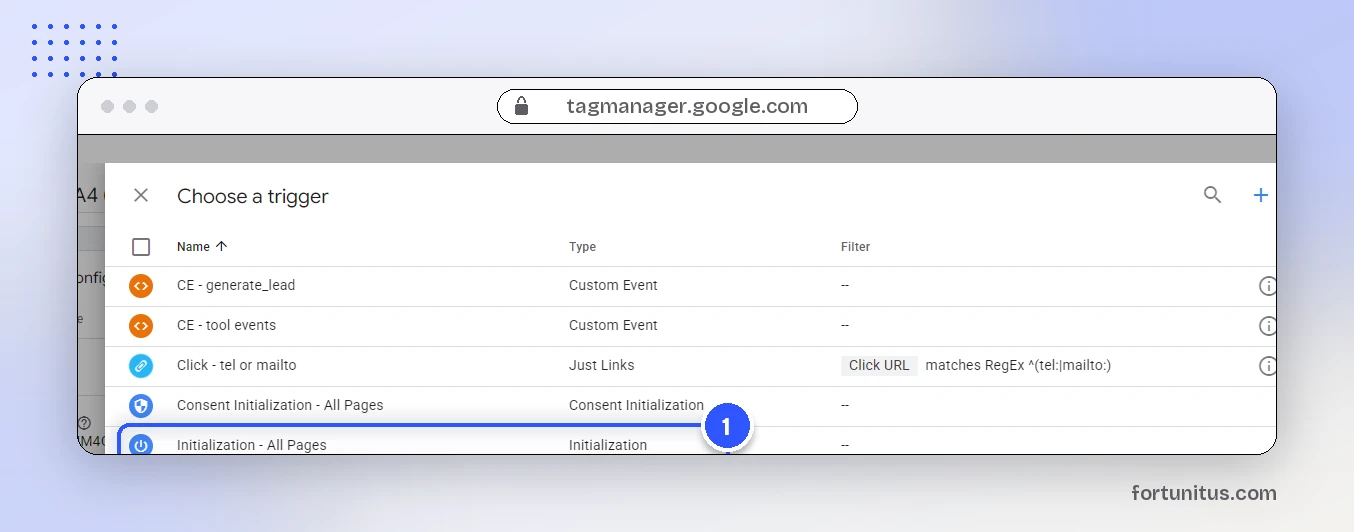
- Remove the old All Pages trigger with the minus icon next to it, so the tag has only one trigger.
- Click Save, then Submit → Publish.

GA4 event tags (for forms, clicks, purchases) can stay on their own triggers. They only need the Google tag to load first.
Cause 2: the cookie banner sends consent the wrong way
With Google Consent Mode, a banner should send a default state when the page loads and an update after the visitor clicks. Google lists two mistakes that produce (not set):
- The banner uses the
defaultcommand for everything, including after the visitor chooses. The first event withsession_startis then lost. - Events are sent with consent denied after the visitor already accepted. GA4 treats them as a separate session that has no
session_start.
To check, connect Google Tag Assistant to your site, accept the banner and open the Consent tab on the next event. You should see a Consent Default step, then a Consent Update step, and the current state should say Granted. If there is no update step, ask whoever installed the banner to send consent with the update command, or switch to a banner that supports Consent Mode v2 properly.
A special case: srsltid links
Google notes that sessions with the srsltid parameter (added to some links from Google Shopping and organic results) can show (not set) when the visitor did not come directly from google.com, for example when someone shared a copied link. That is normal and nothing on your side needs fixing.
Landing page is (not set)
This one is usually much bigger in numbers and much less harmful. In the demo property it is a third of all sessions:

A session gets a landing page from its first page_view. No page view, no landing page. The usual reason is the session timeout: GA4 ends a session after 30 minutes without activity. If the visitor comes back to the same open tab and, say, scrolls or clicks something that sends an event, a new session starts without a page view. The 1-second engagement in the screenshot is typical for this.
What to do:
- Mostly nothing. If engagement for these sessions is near zero, they are tails of earlier visits, not lost traffic.
- If your visitors often leave a tab open for a long time (long articles, configurators, quote forms), raise the session timeout: Admin → Data streams → your web stream → Configure tag settings, then in the panel that opens Settings → Show more → Adjust session timeout. Google's help gives 7 hours 55 minutes as the maximum.
- If many of these sessions have real engagement, check that every page sends a
page_view. On single-page apps and sites with virtual pages, enhanced measurement must be allowed to record page changes from browser history events, or you sendpage_viewyourself.
Campaign or Google Ads columns are (not set)
Here GA4 is missing information about the ad or the campaign. Google lists these causes:
| Cause | How to check | Fix |
|---|---|---|
| Google Ads is not linked to GA4 | GA4 Admin → Product links → Google Ads links | Link the Ads account |
| Auto-tagging is off | Google Ads Admin → Account settings → Auto-tagging | Turn it on, so every ad click gets a gclid |
| Another, unlinked Google Ads account advertises your site | Ask your team or agency which accounts run ads for the domain | Link that account too |
| Manual UTM tags are incomplete or misspelled | Look for links without utm_campaign or with odd values | Build links with all three parameters (source, medium, campaign) |
For manual tagging, the free UTM builder asks for the three required fields and shows which GA4 channel the link will land in before you use it.
Other places you may see it
- Custom dimensions show (not set) for the first 24 hours after you register them. After that, (not set) means the event did not send that parameter.
- Content group is (not set) next to automatically collected events such as
session_startandfirst_visit, because those events do not take a content group. It also appears when the parameter is sent empty. - A user ID registered as a custom dimension shows (not set) for visitors who are not logged in. Google advises against registering User-ID as a dimension at all.
- (data not available) is a different value. It appears when attribution data could not be processed, and there is usually nothing to fix.
After the fix
GA4 does not correct data it has already processed. Note the date of your change and compare the share of (not set) sessions in the weeks after it with the weeks before. For source / medium, the share should drop within a day or two of publishing. If it does not, run through the Unassigned traffic checks, because the two problems often share a cause.
The free tracking checker shows which GA4, GTM, Google Ads, Meta and cookie banner tags your site loads and what is inside your GTM container.
Run the checkerSources
- Google Analytics Help: What the value (not set) means in your reports
- Google Analytics Help: Tagging best practices to avoid unassigned, (not set), and direct traffic issues
- Google Analytics Help: Session (timeout limits)
- Google Analytics Help: About Analytics sessions
- Google Analytics Help: Demo account